The Story of TLS Fingerprints
Ram Valsky
Threat Intelligence
February 11, 2026

If you spend enough time looking at web traffic, you start to notice that not all HTTPS connections look the same. Even though everything is encrypted, the way a browser says “hello” to a server carries a surprisingly rich identity.
That “hello” is the TLS handshake. Over the last few years, the structure of that handshake has become one of the most important signals in security and fraud detection. This post walks through how TLS fingerprinting evolved, what JA3 brought to the table, how Chrome’s randomization complicated things, how we solved it, and why we go even further diving into the raw TLS data without exposing exactly how.
This is not a deep technical article. Think of it as a guided tour of how the field has changed, and why.
What is a TLS fingerprint?
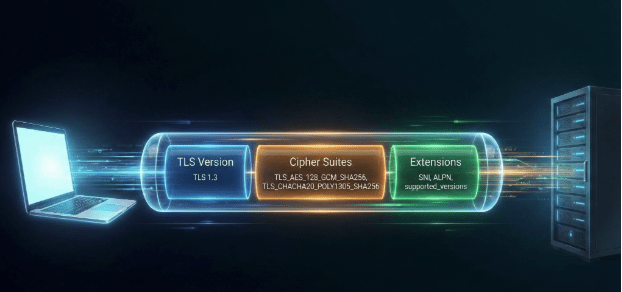
When your browser connects to a website over HTTPS, it doesn’t jump straight into encryption. First, it negotiates:
- Which version of TLS to use (TLS 1.2, 1.3, etc.)
- Which encryption algorithms (“cipher suites”) it supports
- Which optional features it understands (extensions, like ALPN, SNI, and many others)
All of this happens in the ClientHello message – the browser’s introduction to the server.
Different browsers, devices, and libraries construct this ClientHello slightly differently:
- They support different TLS versions.
- They prefer different cipher suites and put them in a specific order.
- They include different extensions, again in a characteristic order.
Crucially:
- It doesn’t rely on cookies or local IDs.
- It’s visible even through encrypted traffic (the ClientHello is mostly unencrypted).
- It’s surprisingly hard for most normal users to change.
JA3: The first widely adopted TLS fingerprint
JA3 is a technique introduced around 2017 that turned that idea into a practical fingerprint. The basic concept:
- Look at the ClientHello.
- Extract the TLS version, list of cipher suites, list of TLS extensions, elliptic curves, and elliptic curve point formats.
- Serialize them in a specific, fixed format.
- Hash that string into an easy to store identifier.
The result is a JA3 hash: a short, reproducible identifier you can attach to a connection. For a few years, JA3 was one of the best ways to recognize what was really sitting behind an IP address. A common Chrome on Windows fingerprint might be considered benign, while a fingerprint strongly associated with a malware framework would raise a flag.
Chrome introduces randomization: JA3 gets noisy
As JA3 became more popular, browser vendors, specifically Google Chrome started introducing changes that made the ClientHello slightly less predictable to improve privacy.
One important change was randomizing the ordering of TLS extensions.
Remember, JA3 relies on the exact order of cipher suites and extensions. If a browser suddenly shuffles the order of some of those fields, the JA3 hash changes even if the underlying capabilities are essentially identical.
That means a single Chrome installation could start producing many different JA3 values over time. From the server side, it looked like a swarm of different clients instead of one stable identity.
Normalizing the chaos: Sorting the extensions
One way to cope with this randomization is to stop treating “order” as sacred. What matters most is which extensions a browser supports, not the random order they appear in.
If two ClientHello messages contain the same set of extensions, but shuffled differently, they’re functionally equivalent. So, a natural idea is: Sort the extensions into a deterministic order before building the fingerprint.
However, by randomizing the order and then sorting it to collapse all the distinct variants, we do lose the specific order information that used to be available before randomization was introduced.
By sorting, [A, B, C] and [B, A, C] both become [A, B, C]. This restores the strong relationship between a given browser engine and its fingerprint.
To see the impact of this, look at the data below from our traffic analysis:
| JA3 Sorted (Normalized) | Unsorted JA3 Count | Count StdDev | Count Avg |
| 0cbe9b81cc46cff9d150bb58c4284999 | 50,701,838 | 2.79 | 1.94 |
| 570a59a4024a8bc24ea2502b33c3e699 | 506,169 | 3.35 | 2.06 |
| bee6822e7ed61ff4e9a753605afe6b20 | 349,075 | 3.69 | 2.30 |
Table 1: The “Collapsing” Effect. Over 50 million unique randomized fingerprints map to a single sorted identity.
The first row is staggering. Over 50 million unique raw JA3 hashes were observed. Without sorting, these looked like 50 million different entities. Once sorted, they all collapsed into a single sorted hash (0cbe9b…). This proves that sorting effectively neutralizes the “noise” created by browser randomization.
The Flip Side: When Stability is Suspicious
While sorting helps us group legitimate randomized browsers, it also gives us a new way to spot fakes.
We expect modern browsers (like recent Chrome versions) to have high “entropy”, they should produce many different unsorted fingerprints that collapse into one sorted fingerprint (like the 50 million example above).
But what if they don’t?
If we see a connection that claims to be a modern Chrome, but it uses a static, non randomized order every single time, that is highly suspicious. It suggests a bot or a script trying to look like Chrome but failing to emulate the randomization behavior.
| Claimed Browser | JA3 Sorted Hash | Unique Unsorted Variants | Verdict |
| Chrome 143 (Real) | 0cbe9b81cc46cff9d150bb58c4284999 | 50,701,838 | ✅ Normal (Randomization active) |
| Chrome 143 (Fake) | cc5a5314fe9bc875b8e12d8f93729925 | 2 | ❌ Suspicious |
| Chrome 143 (Fake) | 76efeb75e046b0de512748cbdfe34f05 | 1 | ❌ Suspicious |
| Chrome 143 (Fake) | d6b23c22fe4de8544d29f106a37c6d40 | 1 | ❌ Suspicious |
Table 2: The “Suspicious Stability.” Real modern browsers have high counts of unsorted variants. Imposters often have just one or two, as shown in the new rows added above.
In this table, the first row behaves as expected: millions of variations collapsing into one. The other rows, however, show sorted hashes that only ever appeared in 1 or 2 unsorted variations. If these clients claim to be a browser that supports randomization, we know immediately that they are lying.
Enter JA4: A modern evolution
| JA4 | Browser | Distinct JA3 Count | Avg Occ/JA3 | StdDev Occ/JA3 |
| t13d1516h2_8daaf6152771_d8a2da3f94cd | Chrome 144.0.0.0 | 39,894,618 | 1.78 | 2.51 |
| t13d1516h2_8daaf6152771_d8a2da3f94cd | Chrome 143.0.0.0 | 8,898,628 | 1.81 | 2.94 |
| t13d181300_e8a523a41297_43ade6aba3df | Chrome 138.0.0.0 | 1 | 2,064,129.00 | NULL |
| t13d1516h2_8daaf6152771_d8a2da3f94cd | Chrome 142.0.0.0 | 1,329,685 | 1.48 | 3.15 |
| t13d1516h2_8daaf6152771_d8a2da3f94cd | Chrome 139.0.0.0 | 1,693,782 | 1.08 | 0.77 |
| t13d190900_9dc949149365_97f8aa674fd9 | Chrome 133.0.6943.141 | 1 | 1,744,312.00 | NULL |
| t13d1516h2_8daaf6152771_d8a2da3f94cd | Chrome 138.0.0.0 | 958,465 | 1.60 | 6.21 |
| t13d1516h2_8daaf6152771_02713d6af862 | Chrome 131.0.6778.33 | 1,448,974 | 1.00 | 0.05 |
| t12d660700_d16616bd43e4_046e095b7c4a | Chrome 133.0.6943.141 | 1 | 1,187,941.00 | NULL |
| t13d1516h2_8daaf6152771_d8a2da3f94cd | Chrome 141.0.0.0 | 673,827 | 1.28 | 1.73 |
| t13d3613h1_bcee18a5b459_ecd0401ec68b | Chrome 117.0.0.0 | 1 | 842,495.00 | NULL |
| t13d3613h1_bcee18a5b459_ecd0401ec68b | Chrome 116.0.0.0 | 1 | 841,992.00 | NULL |
Table 3: This view highlights the dominant JA4 hashes associated with different Chrome versions. Notably, some of these JA4 hashes correspond to only a single unique JA3 variant, a pattern that is typically regarded as suspicious.
As TLS stacks evolved, people recognized limitations in JA3, in addition it never got high adoption rate and the attempts to release an open source dataset never succeded. JA4 is the new standard proposed to solve these issues. It has rapidly gained significance in the industry, seeing adoption by major security platforms.
A JA4 fingerprint looks like t13d1516h2_8daaf6152771_e43c810504f9. The big benefit of JA4 over JA3 is its structure: it is divided into three separate parts (a, b, and c). The first part (Part A) actually contains cleartext data like the protocol (TCP/QUIC) and TLS version, number of ciphers and extensions in use and HTTP versions, making it partially human readable and allowing for smarter “fuzzy” matching.
This structure also fingerprints additional fields that JA3 missed, such as ALPN (Application Layer Protocol Negotiation) and signature algorithms, giving us a much higher fidelity signal.
Going beyond JA3/JA4: Reading more from the raw TLS data
JA3 and JA4 are great summaries, but they compress the rich structure of a TLS handshake into a single identifier. That’s powerful, but it discards nuance. Teams that care deeply about fraud detection often look at specific pieces of TLS data in more detail.
1. Deep dive into Cipher Suites
Inside the ClientHello, the client sends a list of supported cipher suites. We analyze this list in several ways.
First, we look at the first entries, which reveal the client’s strongest preferences. Different browser engines (Blink, WebKit, Gecko) prioritize ciphers differently, so a “Safari” user sending “Chrome style” preferences is an immediate red flag.
Second, we look at the total number of ciphers. A very high or very low number is often a quick signal of suspicious activity, as bots or stripped down tools rarely match the standard length of a full browser.
Finally, we analyze the composition of the list itself. Typical browser versions use a consistent, predictable set of cipher suites. By identifying the specific cryptographic library (like OpenSSL vs. BoringSSL) and cross reference the set with the claimed browser version, we can spot imposters, like a client claiming to be the latest Chrome but missing a cipher that was introduced in that very update.
2. Supported TLS versions
Modern browsers generally support at least TLS 1.2 and TLS 1.3. Very old versions or unusual patterns can indicate legacy stacks or customized TLS implementations (bots, scrapers).
We can define “modern expectations” per engine. If a recent Chrome/Firefox does not offer the latest TLS versions, that is notable. If it offers very old versions as well, that may be suspicious depending on context.
3. GREASE and other subtle hints
Browsers like Chrome use a technique called GREASE (Generate Random Extensions And Sustain Extensibility) to keep the ecosystem healthy: they advertise some “garbage” values in certain TLS fields to ensure servers handle unknown values correctly.
Different engines handle GREASE slightly differently. The pattern of GREASE related fields in the handshake can be characteristic. If a client presents GREASE patterns that don’t match its claimed engine, that is a red flag.
Conclusion
The industry’s move toward JA4 is a welcome advancement, and we are proud to have been early adopters of the standard. It provides a robust foundation for identifying clients in an increasingly complex landscape. Yet, as browsers introduce new privacy features and automation tools become better at mimicking legitimate traffic while becoming better at hiding the things that distinguish them from real browsers, the race doesn’t end there. Defenders cannot rely on signatures alone; we must dig deeper into the nuance of the connection. Ultimately, the TLS handshake is a language, and if you know how to listen, it tells you exactly who is speaking.

Author
Ram Valsky
Security Research