Detecting Automated and Anti-Detect Browsers: A Security Researcher’s Approach
Refael Filippov|
Threat Intelligence | February 25, 2026
Introduction
Automated and anti-detect browsers are increasingly used for credential stuffing, account takeover, ad fraud, scraping, and bypassing security controls. From a defender’s perspective, the challenge is no longer only “is this a bot?” but “is this environment pretending to be a real browser?” – and if so, how can we reliably tell?
This post describes a research project aimed at building practical detection methods for automated and anti-detect browsers. The goal is to create techniques that can be used to protect web applications by identifying when a session is driven by automation or running inside a modified, fingerprint-spoofing environment – even when the browser claims to be a standard Chrome, Firefox, Safari, etc.
We focus on three complementary approaches: executable analysis, environment fingerprint comparison, and behavioral interception. We also show how automation frameworks (Playwright, Puppeteer, Selenium) can be used to trigger and correlate behavior that exposes these environments. As a concrete example, we apply these methods to AntBrowser, an anti-detect browser, and describe the kinds of detections that emerge.
Why This Matters for Security
Legitimate users run normal browsers. Attackers and abusers often use:
- Automated browsers (e.g. driven by Selenium, Playwright, Puppeteer) for scripting clicks, form fills, and navigation.
- Anti-detect browsers that mimic real browsers but alter fingerprints (canvas, WebGL, fonts, screen resolution, etc.) and sometimes hide automation artifacts.
Both can report a normal-looking User-Agent, support JavaScript, and pass simple “bot vs. human” checks. Detection therefore has to go deeper: we need signals that come from the executable, from the browser’s exposed environment (objects, APIs, native vs. scripted code), and from when and how certain functions are called – especially in response to automation actions.
Detection Technique 1: Executable and Process Analysis
The first line of inquiry is the binary itself. Automated and anti-detect browsers often ship as custom executables (e.g. Chromium-based builds) with distinct names, paths, or metadata.
What we do:
- Inspect the process name and path of the browser executable.
- Search the executable’s on-disk binary for telltale strings (product names, automation-related keywords, vendor-specific identifiers).
- Compare these strings to a baseline of known “clean” browser builds.
- In some cases searching the process memory after running the executable (easier via a memory dump) can provide us information that otherwise would’ve been hidden; for example in case some of the on-disk strings are encoded\encrypted.
Why it works:
Many anti-detect and automation-oriented products use a forked or rebranded Chromium (or other engine) and leave identifiable strings inside the binary. Even if the browser hides its name in the User-Agent or in JavaScript APIs, the executable on disk can still reveal the true product. This gives a low-false-positive, high-confidence signal when a match is found.
Limitation: This typically requires access to the client environment (e.g. an installed agent or a controlled desktop). It is less applicable in a pure “website-only” context where the server only sees HTTP and JavaScript.
Detection Technique 2: Environment Fingerprint Comparison (Window and DOM Enumeration)
The second technique assumes we can run JavaScript in the browser. We treat the browser’s global environment (e.g. `window`) and DOM as a fingerprint: we enumerate properties, objects, and functions, and compare them to a known-good baseline for the claimed browser and version.
What we do:
- Use a recursive enumerator to walk all reachable properties and elements, logging:
- Presence or absence of specific variables and APIs.
- Types (function, object, etc.) and, where relevant, values or signatures.
- Build baseline snapshots from real, unmodified browsers (e.g. “Chrome 140 on Windows 11,” “Firefox 139 on macOS”).
- When an unknown client claims to be “Chrome 140,” we compare its snapshot to the real Chrome 140 baseline.
Signals we look for:
- Missing or extra properties: APIs or globals that should exist in the claimed browser but are absent (or vice versa).
- Non-native implementations: Functions that are supposed to be native (e.g. certain DOM methods, `eval`, `Function`) but contain or reference non-native JavaScript (e.g. wrappers, polyfills, or instrumentation). Checking `.toString()` and comparing to known native implementations often reveals patches or hooks.
Why it works:
Anti-detect and automation frameworks frequently inject code, replace native APIs, or alter the environment to hide automation or change fingerprints. Those changes leave traces: extra objects, modified function bodies, or missing/added properties. By comparing to a clean baseline of the same browser and version, we can detect these deviations with high precision.
Detection Technique 3: Behavioral Interception (Function Hooking and Correlation)
The third technique focuses on behavior: we hook as many global functions as we can and observe when they are called, with what arguments, and from where (call stack). In a real user session, only a subset of these functions are ever invoked; in automated or anti-detect environments, we often see additional, unexpected calls that betray instrumentation or automation.
What we do:
- Use a function enumerator and hooking tool to:
- Recursively discover functions on `window` and nested objects.
- Wrap each discovered function with a hook that logs:
- Function path (e.g. `Element.prototype.setAttribute`).
- Arguments and (where possible) return value.
- Call stack (caller, callee) to see who invoked it.
- Load this hooked page in:
- A real browser (baseline).
- The target (e.g. automated or anti-detect browser).
- Compare which functions are triggered during the same user flow (or lack of user flow). Calls that appear only in the automated/anti-detect environment – especially with stack traces pointing into automation or vendor code – become strong detection signals.
Why it works:
Automation runtimes and anti-detect layers must interact with the same DOM and JavaScript APIs as real code. To do that, they often call APIs in ways or at times that a normal page would not (e.g. synthetic events, internal bookkeeping, or fingerprint spoofing). When we see, for example, `Element.prototype.setAttribute` or `scrollIntoView` called from a stack that includes Playwright/Puppeteer/Selenium or an anti-detect script, we have a clear indicator of automation or modification.
Correlation with automation frameworks:
We can go one step further: we drive the same page with Playwright, Puppeteer, or Selenium (e.g. “move mouse to (x, y),” “click,” “type”) and record which hooked functions fire. If we later see that exact pattern of calls on a production site – without any corresponding automation framework in our test lab – we can still flag it as “behaves like automation” and deploy that as a detection rule. So the lab becomes a factory for signatures: “when the mouse is moved by Playwright, the following APIs are called in this order; if we see that on a live session, we treat it as automated.”
Putting It Together: A Practical Workflow
- Baseline collection: Run the element extractor and function hook script in real Chrome, Firefox, Safari (and versions) on clean VMs; store snapshots and baseline call patterns.
- Target analysis: Run the same tools inside the automated or anti-detect browser, with and without automation (Playwright/Puppeteer/Selenium) driving the page.
- Diff and triage: Compare snapshots (missing/extra properties, non-native code) and compare invocation logs (unexpected functions, automation-related stacks).
- Signature creation: Turn recurring differences into detection rules (e.g. “if this property is missing and this function is called from this path, flag as anti-detect” or “if this sequence of API calls matches our Playwright profile, flag as automated”).
- Deployment: Implement these rules in the protection layer (e.g. server-side or client-side) to tag or block suspicious sessions.
Screenshots and logs from these steps can be used to document findings and tune false positives.
Case Study: AntBrowser
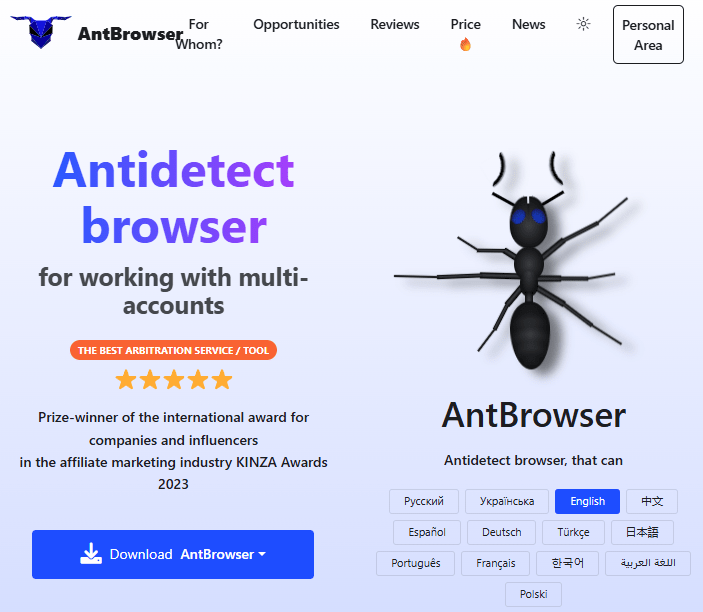
What is AntBrowser?
AntBrowser is an anti-detect browser aimed at users who need to manage multiple accounts or identities from one machine – e.g. affiliate marketers, social media managers, or e-commerce operators. It is built on Chromium and is available on Windows, macOS, and Linux. The vendor markets it as a tool for creating isolated browser profiles with distinct digital fingerprints so that each profile appears to websites as a different device or user. It has gained traction in Russian-speaking markets and on platforms such as VK and Avito.
Typical use cases:
- Managing multiple social or advertising accounts without cross-account detection.
- Running several e-commerce or crypto-exchange accounts from a single computer.
- Avoiding fingerprint-based linking when the same user accesses multiple accounts.
Why it’s relevant for detection research:
Anti-detect browsers like AntBrowser must alter or hide many of the same signals that security products use to detect automation or fraud. That means they inject code, override or wrap native APIs, and change environment properties. Our approach is designed to find exactly those kinds of modifications.
What we found (high level):
Using the techniques above – especially environment comparison (window/DOM enumeration) and function interception – we were able to identify multiple behaviors that distinguish AntBrowser from an unmodified Chromium build of the same version. Examples of the kind of signals we look at include:
- Unexpected or repeated calls to DOM/API methods that do not occur in the same flow on a clean browser.
- Stack traces that point to AntBrowser or its instrumentation code when native-looking APIs are invoked.
- Differences in the global environment (e.g. extra objects, modified or non-native implementations of standard functions) when comparing an AntBrowser snapshot to the real Chrome/Chromium baseline.
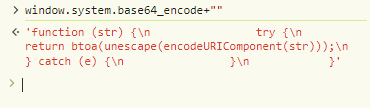
A few lines of the strings that we got from the Chrome executable indicate the existence of a function called “window.system.base64_encode”:
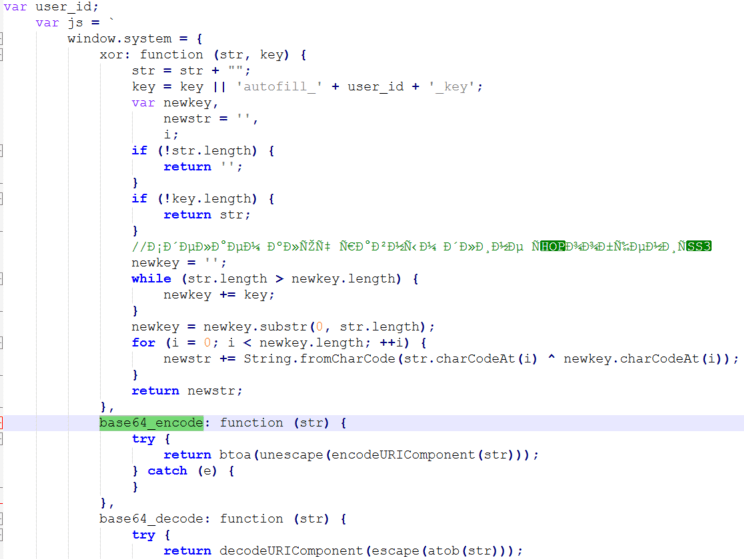
While it shouldn’t exist on a normal browser, AntBrowser does have it and it contains the exact definition that we saw in the strings output:
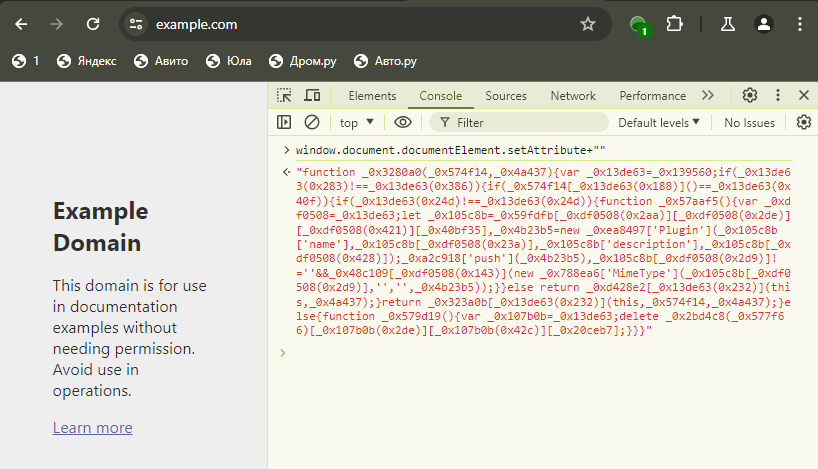
An example of a non-native implementation of a function in an AntBrowser session:
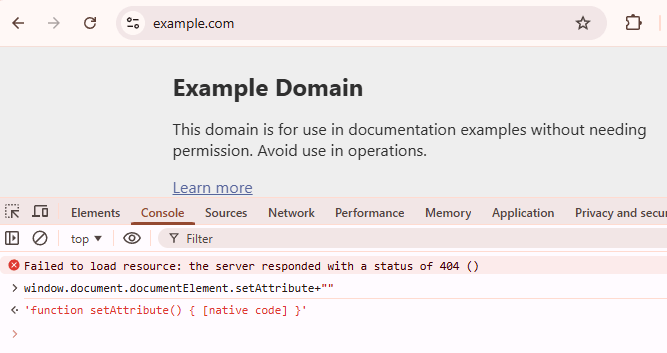
While in a regular browser of that type and version we expect to get:
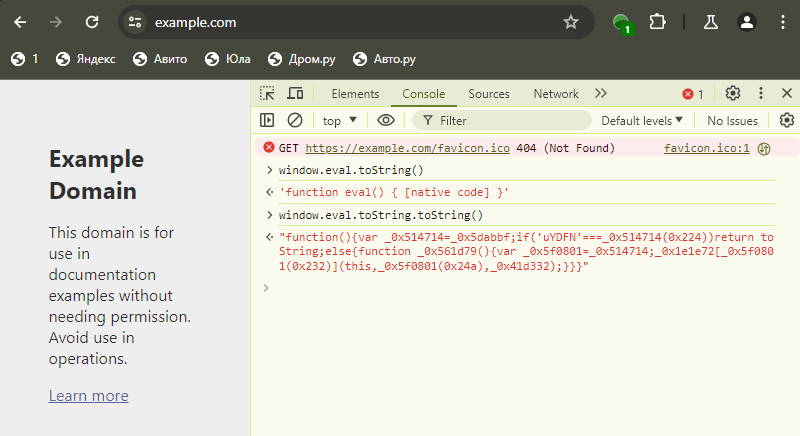
In some cases a function returns what seems to be native code, however, is was still not rewritten properly:
An illustration of the hooking mechanism, intended to get the stacktrace and other pieces of information. In this example the initial call is made to a function we defined ourselves but in real-world scenarios, multiple fraudulent browsers behave the same way once the browser is instructed to automatically perform actions such as scrolling:
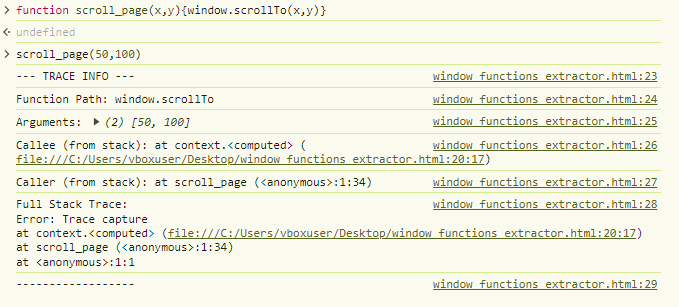
These findings allow us to build detection rules that can flag AntBrowser (and similar products) even when the User-Agent and other surface-level indicators are spoofed.
Implications for Defenders
- Layered detection: Relying on a single signal (e.g. User-Agent or one JavaScript property) is brittle. Combining executable analysis (where available), environment fingerprint comparison, and behavioral interception gives a much more robust picture.
- Baselines are critical: Maintaining up-to-date baselines for real browsers (and versions) is essential. As real browsers evolve, baselines must be updated so that we don’t mislabel new legitimate behavior as malicious.
- Automation as a source of signatures: Using Playwright, Puppeteer, and Selenium to drive pages and record which APIs get called provides a repeatable way to generate “automation-like” behavioral signatures that can be used even when the protecting site does not run automation itself.
- Anti-detect is a moving target: Vendors will adapt. Detection logic should be designed for easy updates (e.g. new snapshot diffs, new hooked APIs, new stack patterns) and monitored for false positives as browsers and anti-detect tools change.
Conclusion
Detecting automated and anti-detect browsers requires going beyond surface-level checks and combining multiple techniques: analysis of the browser executable, deep comparison of the JavaScript and DOM environment to a known-good baseline, and behavioral analysis via function hooking and correlation with automation frameworks. This project demonstrates that such an approach is feasible and that it can yield concrete, actionable detections – as illustrated by our work on AntBrowser.
We will continue to refine these methods, add baselines for new browser versions, and document new findings (with screenshots and sanitized examples) as we go.

Author
Refael Filippov
Cyber Research